> For the complete documentation index, see [llms.txt](https://docs.odinbot.io/llms.txt). Markdown versions of documentation pages are available by appending `.md` to page URLs; this page is available as [Markdown](https://docs.odinbot.io/tracking-academy/tools/for-finding-wallets/odinbot-pro.md).
# OdinBot Pro
**OdinBot Pro** is built to solve one of the core problems in copy-trading: finding wallets that consistently generate profit. Instead of manually checking thousands of traders, OdinBot Pro screens millions of wallets in under a second, filters them by performance, and gives you the full breakdown of how they trade.
### Why OdinBot Pro is the most powerful wallet finder
Copy-trading depends entirely on the quality of the wallets you mirror. The difference between a skilled trader and a random gambler is massive, and OdinBot Pro gives you tools to tell them apart instantly.
OdinBot Pro helps you:
* Surface consistently profitable wallets
* Avoid traders who rely on luck or high-risk patterns
* Spot early entries before widespread attention
* Filter out bot wallets
* Understand not just performance but trading behavior
Instead of guessing or relying on hype, OdinBot Pro gives you real data.
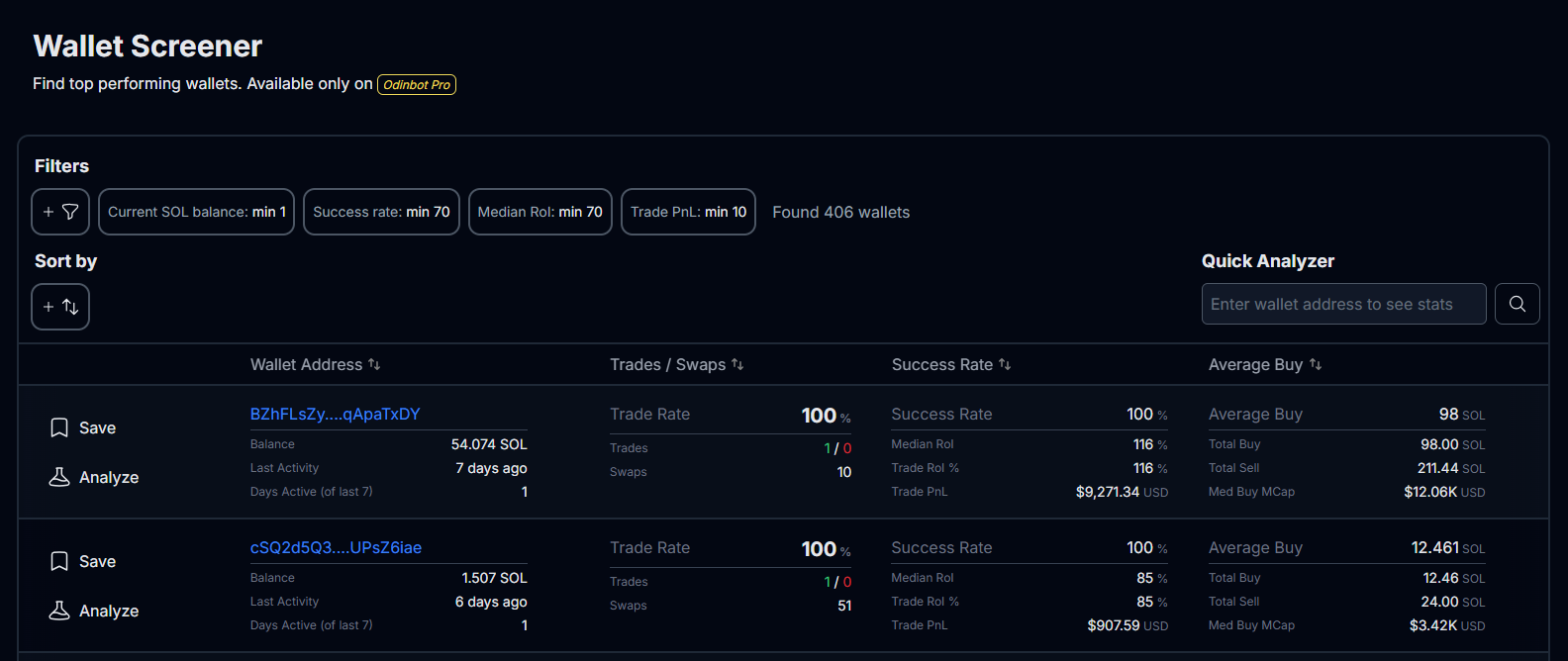
## Wallet Screener
Open the Wallet Screener inside OdinBot Pro and begin applying filters. You can combine as many filters as you want, or start broad and then narrow down.
{% content-ref url="/pages/sqy87cpiUjAze3kNJVCA" %}
[What is OdinBot Pro and how to start using it?](/odinbot-pro/what-is-odinbot-pro-and-how-to-start-using-it.md)
{% endcontent-ref %}
Some of the most reliable starting points:
* Success Rate
* Median RoI
* Trade RoI
* Total PnL
* Active Days
* Hold Time
* Median Buy Market Cap
These metrics help isolate traders who consistently trade well.
## Filter by consistent profitability
Wallets that perform well over many trades are far more reliable than wallets with one big pump.
Useful filters for this step:
* Minimum number of trades
* Minimum number of successful tokens traded
* Trade RoI range
* Median RoI range
* Total PnL range
This highlights traders with established patterns.
## Eliminate low quality or risky traders
Not every wallet with profit is worth mirroring. Some rely on harmful patterns like chasing tokens with low liquidity, or buying late into curves.
Filters that help here:
* Bot usage percentage
* Median buy market cap (very low values indicate high risk)
* Hold time filter
* Tokens swapped (helps spot spam trading behavior)
This step helps you avoid wallets that look profitable but often lead copy-traders into bad entries.
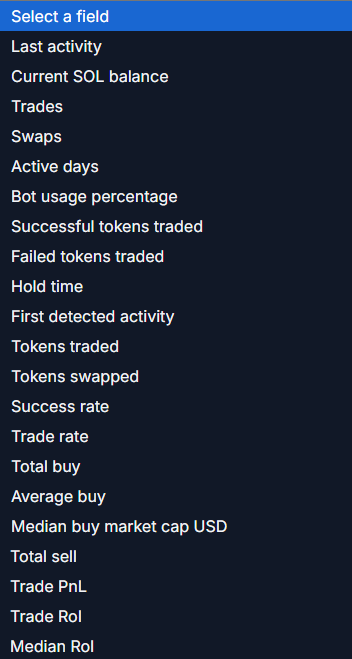
## Sort your results
After filters are applied, sorting becomes your final precision tool.
You can apply one sort rule at a time, but you have a wide range of options. Virtually every filter corresponds to a sortable metric. This allows you to take a list of "good" wallets and immediately bring the "best" ones to the top based on your specific priority.
{% content-ref url="/pages/0eP4H2uJShvXBYHtY2He" %}
[Filters](/odinbot-pro/filters.md)
{% endcontent-ref %}
Common ways to rank your results:
* Total PnL: See who made the most profit
* Median RoI: See who gets the best median return on investment
* Success Rate: See who has the most successful trades
* Active Days: See who has been trading the longest
* Last Activity: See who had the most recent trade
## Detailed wallet analysis
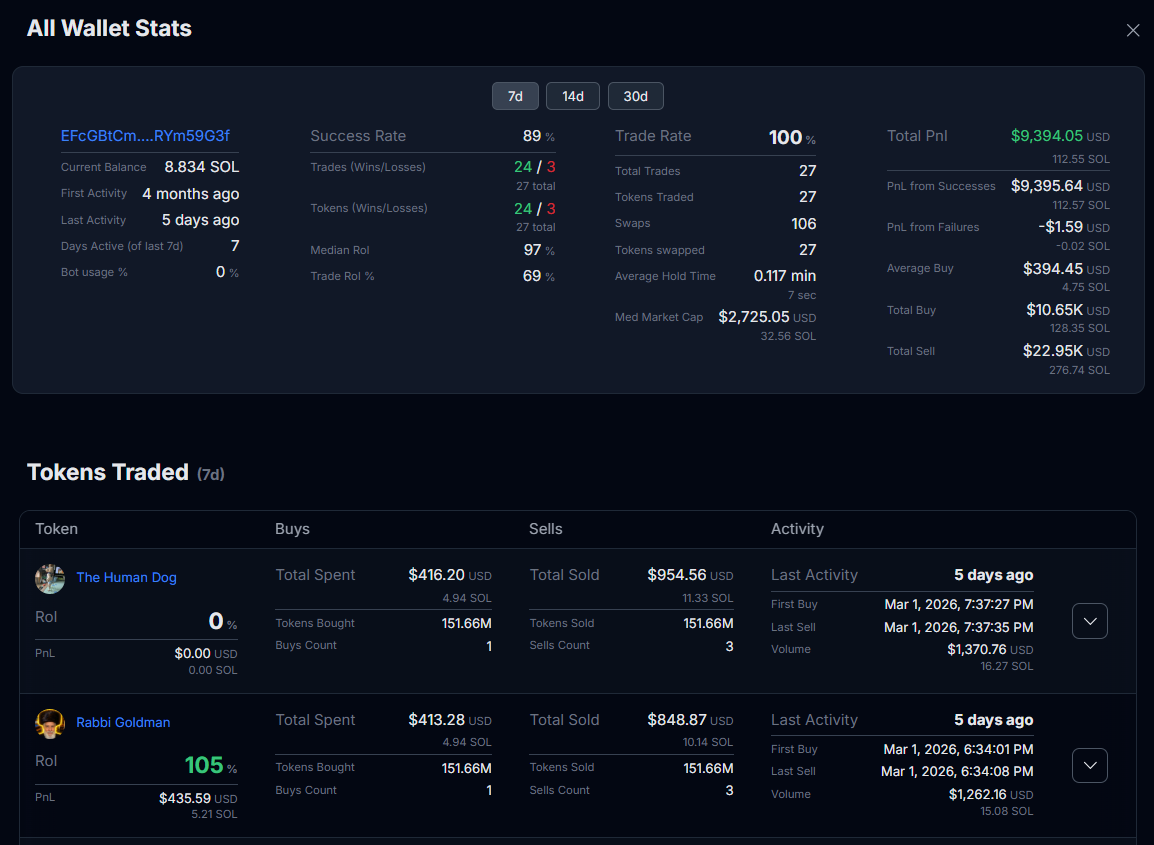
Once you find a promising wallet, open it with OdinBot Pro's Wallet Analysis.
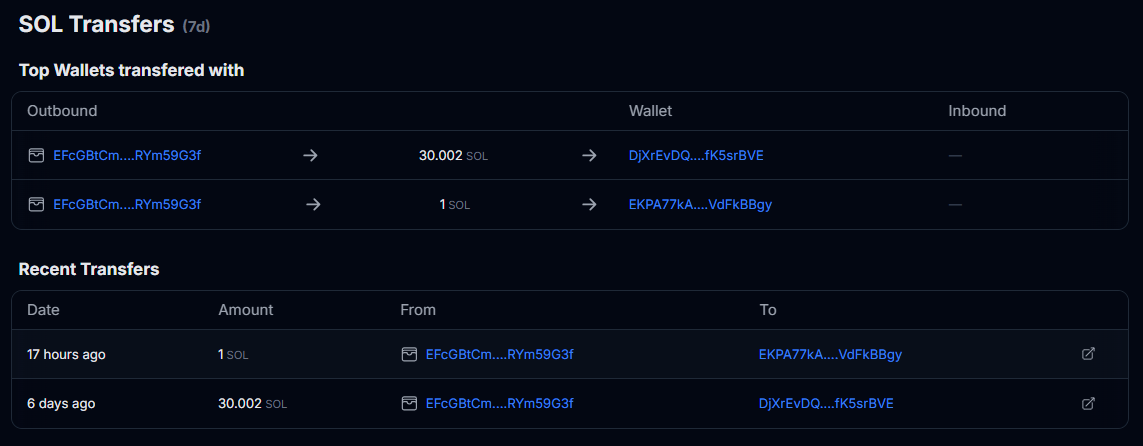
The Wallet Analysis page helps you evaluate:
* Their win and loss patterns
* Real profit vs. inflated metrics
* How early they usually buy
* How long they hold
* How they behave on profitable and losing trades
* Trading frequency
* Transfer behavior (detects funding sources and patterns)
{% content-ref url="/pages/GbllLW8VjT9ZIUIw8nTi" %}
[For Finding Wallets](/tracking-academy/tools/for-finding-wallets.md)
{% endcontent-ref %}